
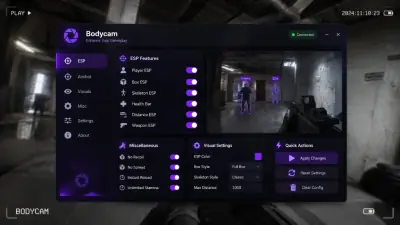
Bodycam ESP Options: Boxes, Skeleton, Chams, Drone and Bomb
Bodycam has no HUD, which makes the ESP do double duty. Here is what each visual element actually tells you and which ones are worth leaving on.
Bodycam strips the HUD out. No crosshair, no ammo count, no minimap, barely anything on screen but the lens. That makes an ESP overlay more useful than it is in a game that already tells you where things are, and it also makes clutter worse, because there is no existing interface for the extra information to blend into.
Every element in the visual list has a job. Some are worth running permanently, some are situational.
Box ESP
A box around each player. Fast to read, cheap to process, works at any range. It tells you a body exists and roughly where the edges of it are, which is enough to pre-aim a corner or decide not to walk through a doorway.
Skeleton
Skeleton draws the body's structure: spine, limbs, head. It shows stance, which a box cannot. In Bodycam, where players crouch behind furniture and lean around frames, the difference between standing and crouched is most of the read.
Skeleton is noisier. Keep it for interiors and turn it off in open areas if the lines start competing with the environment.
Player chams
Chams fill the model with a solid colour so the body stands out against the house. Bodycam interiors are dark, brown and full of visual noise, and a flat coloured silhouette cuts through all of it.
Weapon chams do the same for the gun, which makes a raised weapon obvious before the player is. Local chams apply to your own model, useful in third person.
Snaplines
A line from the bottom of the screen to each player. Handy in a mode with lots of vertical space or when someone is behind you and the boxes alone do not communicate direction. Turn them off once you know the map.
Health bars, distance and nicknames
Health bars tell you whether the person holding the angle is one shot or full. Distance separates a fight you can take from one you cannot. Nicknames are cosmetic but help you track a specific player across a round.
Distance is the one to cap. A 60 metre label on someone two rooms away is noise. Set the maximum range low enough that only relevant players get labelled.
Team check
Removes your own squad from the overlay. Leave it on unless you are running solo and want to know where your teammates are, which is a different use case entirely.
Drone ESP and bomb ESP
These are the Bodycam specific entries and the two worth paying attention to.
Drones are a real reconnaissance tool in this game. Knowing where one is hovering before it spots you changes how you approach a building. Bomb ESP tracks the objective in Body Bomb: the charge, the carrier, and the timer.
In Body Bomb the carrier cannot shoot while holding the charge, so knowing which body has it is most of the round solved.
No flash
Bodycam leans on dark interiors and bright entry points. No flash removes the whiteout when someone clears a room with utility or you step from shade into sunlight.
Building a readable overlay
Legit: player chams, health bar capped short, distance capped, everything else off.
Information heavy: boxes plus skeleton plus bomb and drone ESP, with snaplines off.
Rage: everything on, full colour customisation, no caps.
Save each as its own config. The overlay is the part of the build most likely to get out of hand, and it is also the easiest to fix with two saved presets instead of one overloaded one.